

Changing pages from a chat
Every change Confluence Explorer makes to a page starts in a chat (see Asking an AI): one page, a directory, any mix of directories, pages and tags, or the whole space. A bar above the chat’s question box says what its review holds, such as “4 suggestions · 1 edit to decide”, and Open the review opens it over the whole window, in four steps: Review, Edit, Stage and Push. Review in the sidebar lists every chat with a review waiting, and opens each the same way; its ⋯ menu, there or in a review, clears the review or deletes the chat. The question box stays at the bottom of the review, so you can ask the chat to rework a suggestion or an edit, and Exit to chat or Back to Review, or Esc, goes back. Nothing changes in Confluence until you confirm a push.
Get suggestions
Section titled “Get suggestions”- Start a chat with a review. A new chat on a directory or on chosen pages offers Review for problems: pages that contradict or repeat each other, content that is out of date, and pages that are missing or in the wrong place. A new chat on one page offers Suggest improvements.
- Turn a conversation into changes. Once a chat has begun, Add from chat, in the bar above the question box, lists the changes the conversation found or agreed.
The suggestions go to the review’s Review step, and the answer says how many, with a link. When a chat’s pages are too many for one request, the review reads them in batches, related pages together, and the header shows its progress; Stop ends it with nothing kept.
Rework them with the chat
Section titled “Rework them with the chat”Ask the chat in your own words, for example “make the first one more specific” or “drop the one about the pager”. It rewords, adds or removes suggestions, and the answer says what it changed. A reworded suggestion keeps its earlier wordings under Reworded, and Use this puts one back.
Suggestions to recommend are cards grouped by page. Below them, folded, are In progress (an edit being written, to decide, staged, or failed), Not edited (an edit that changed nothing or was not sent, with why) and Closed and dismissed (pushed, already done, no longer relevant). A suggestion with an edit under way is not ticked again; Recommend again offers it once its edit failed, or the chat reworded it.
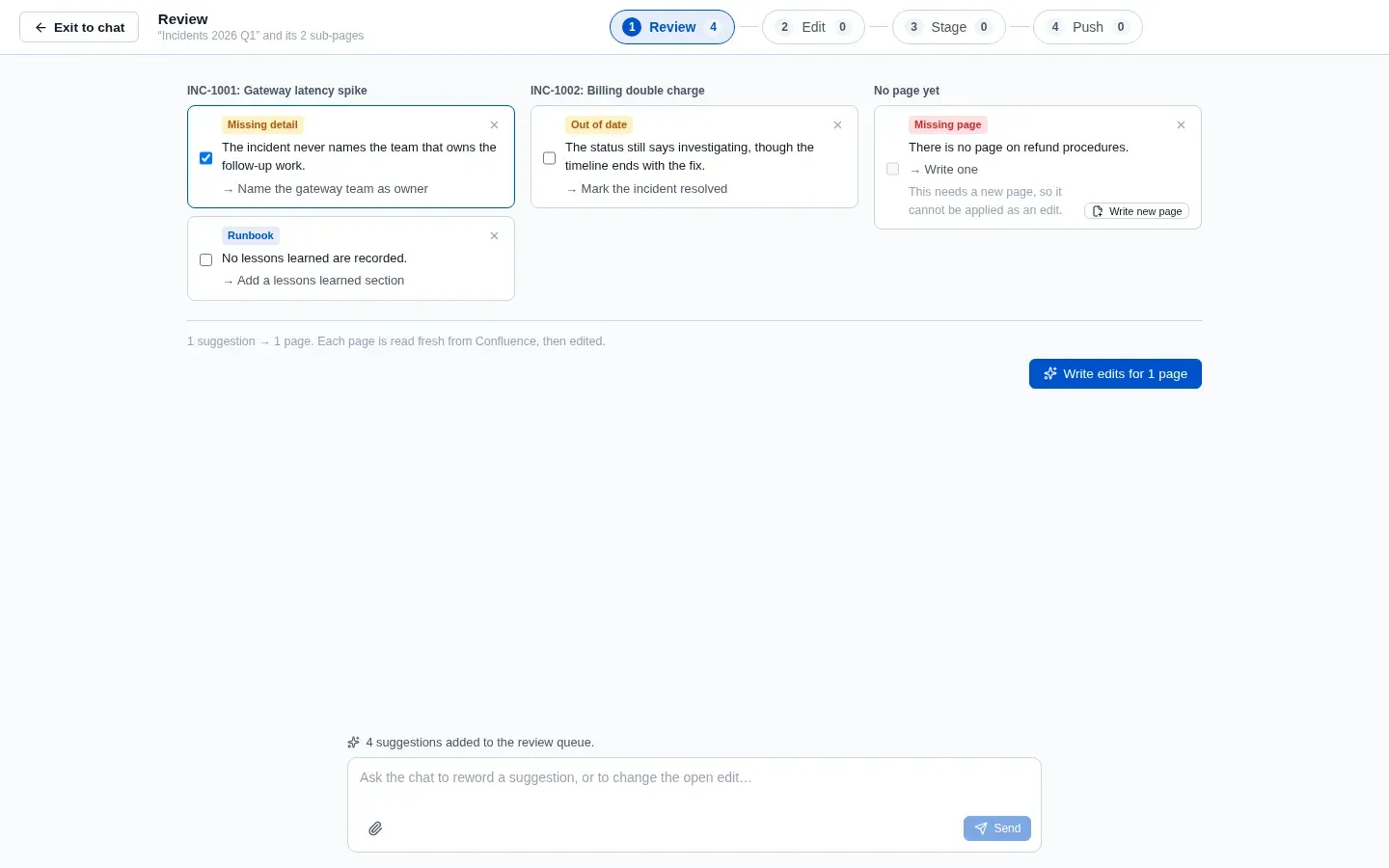
Every suggestion that cannot be ticked says why:
- Moving, splitting or merging a page is done in Confluence. For a page that should exist and does not, Write a new page opens Writing a new page.
- Redrawing an image, a diagram or a chart’s look, or changing a macro’s settings, is work only
a person can do: an edit changes only text. Such a suggestion says “The AI cannot make this
change” and what to change in Confluence. When only part of a suggestion is like that, it can
still be ticked, says which part is yours, and its edit lists it under To do in Confluence.
A chart’s numbers are the table inside it, and a diagram drawn with characters such as
|is text, so the AI edits both. - A page the chat did not read is named, with a reminder to ask about that page to edit it.
Write the edits
Section titled “Write the edits”Tick the suggestions you want and click Write edits for N pages. The line above it counts them, such as “3 suggestions → 5 pages”, and each page gets one edit carrying out only those suggestions. Several pages are written at once, as many as Settings → AI provider → requests at once allows. Before the edit is written, the page is read from Confluence. If someone changed it since the suggestion was made, the copy on your computer is updated, and the AI first checks each suggestion against the page as it is now: one that is already done, or no longer makes sense, is not applied and goes back to the suggestions with the reason.
Decide each change, side by side
Section titled “Decide each change, side by side”The Edit step lists the edits on the left, grouped by each time you asked for them. A page being written shows its current step and how long it has taken; open it to follow every step and the answer so far, where the AI streams it, until it turns into the edit. Open one to see the page as it is now and the edit side by side, with the room of the whole window. Each change sits between them with Accept and Reject, and Undo to change your mind; Accept all and Reject all decide the page at once. Beside it is the AI’s recommendation: the suggestions applied, what it says it changed, and anything it did not apply.
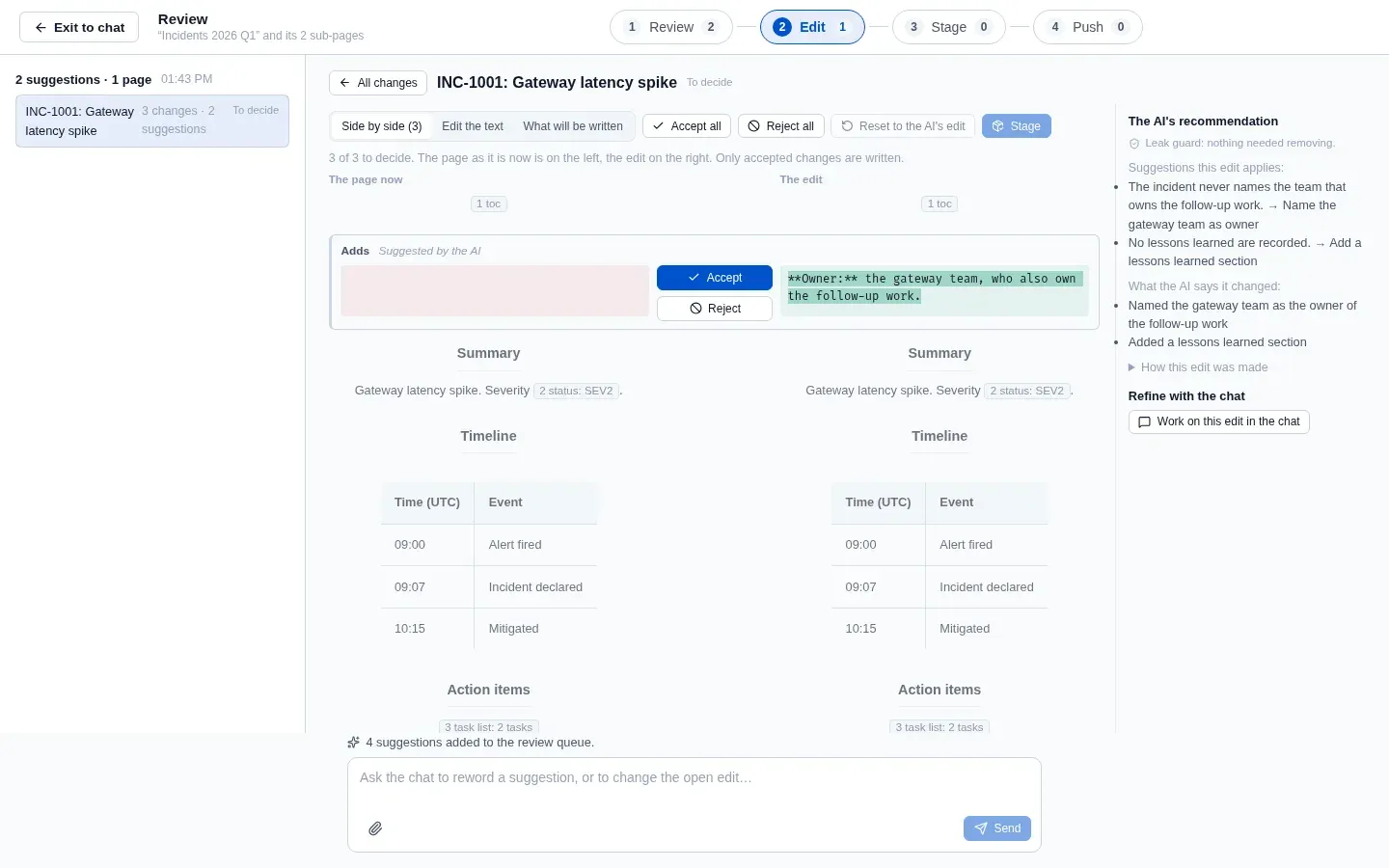
Work on this edit in the chat makes your next question about that edit, shown as “Working on” above the question box. Ask for a change, such as “shorter”, and the chat proposes a revised edit; Accept into the edit adds its changes for you to decide, or Dismiss it. Edit the text lets you change the page yourself, Reset to the AI’s edit brings back the first edit, and What will be written shows the page with only the accepted changes.
Parts of a page that Markdown cannot hold, such as a table of contents, a status, a panel, an image or a page link, appear as markers like ⟦1 toc⟧ and are written back exactly as they were. An image attached to a synced page, and a draw.io or Gliffy diagram’s preview, is shown above its marker. A change that removes one says so, and the part is removed only if you accept that change. A page’s own details, such as its id, version and author, are never written into it.
Stage and push
Section titled “Stage and push”Once every change of a page is decided, with at least one accepted, it waits at the Stage step, where Stage moves it on to Push. Changing the edit after that unstages it, so what you push is what you looked at. The Push step lists the pages staged from this chat; the Review page in the sidebar lists the pages staged in every chat of the space, under Push all staged.
Tick the pages to push and click Check and push. Each page is checked without writing anything, then the confirmation lists what will be written and any page with a problem, with why.
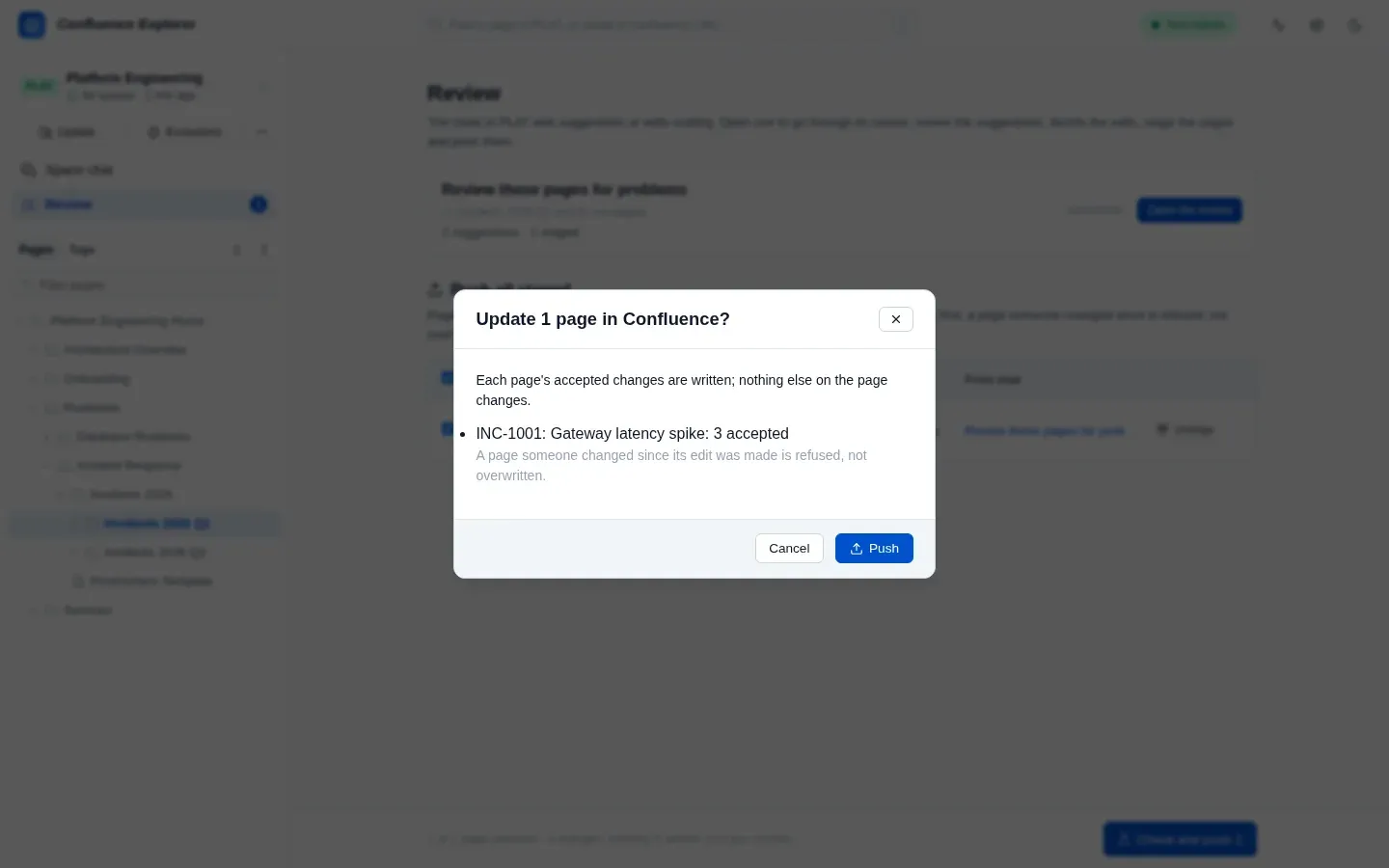
Each push names the version its edit was made from. A page someone changed since is refused and nothing is written over their change; Make this edit again from the current page starts again from the page as it is now.
What is left out
Section titled “What is left out”- Excluded pages are never read, suggested, edited or listed, and never named.
- Pages holding a secret are left out and listed under “Left out”.
Chats, their queues and their edits are saved on your computer, so they survive restarting the app.
How this is checked
Section titled “How this is checked”test/chatQueue.test.ts checks that the chat rewords, adds and removes suggestions and an earlier
wording comes back, that an edit is made from the newer page and a suggestion already done is not
applied, that the chat’s revision is accepted or dismissed and its page is checked on every turn, and
that only staged pages are pushed, never an excluded one. test/branchRuns.test.ts checks that each
edit carries only its own suggestions, that only accepted changes are written with a table of
contents kept, that a page changed by someone else is refused, and that a page’s own details are
never written, that an edit that changes nothing is not edited and says why, and that a suggestion
only a person can do cannot be recommended. test/attachments.test.ts checks that an edit’s images
are served only as images of a synced page that is not excluded. test/editForm.test.ts checks that every test page is written back exactly when
nothing changes. test/e2e/branches.e2e.ts makes, stages and pushes an edit from a page a colleague
changed, and test/e2e/push.e2e.ts changes a page with a panel, against a real Confluence Data Center.