
What leaves your computer
Confluence Explorer runs on your computer and sends page content to exactly one place you did not already trust: the AI provider you choose. Three things limit what goes there: exclusion rules that keep whole pages away from the AI, a leak guard that checks everything before it is sent, and a server that answers only your own computer.
Excluded pages
Section titled “Excluded pages”Some pages should never be sent to an AI at all, such as anything under a “Restricted” or “HR” section, however safe a single question about them might look. Each space can have a list of rules, and a page matched by any rule is excluded, together with everything under it.
Click Exclusions, under the space’s name in the sidebar, to edit the list.
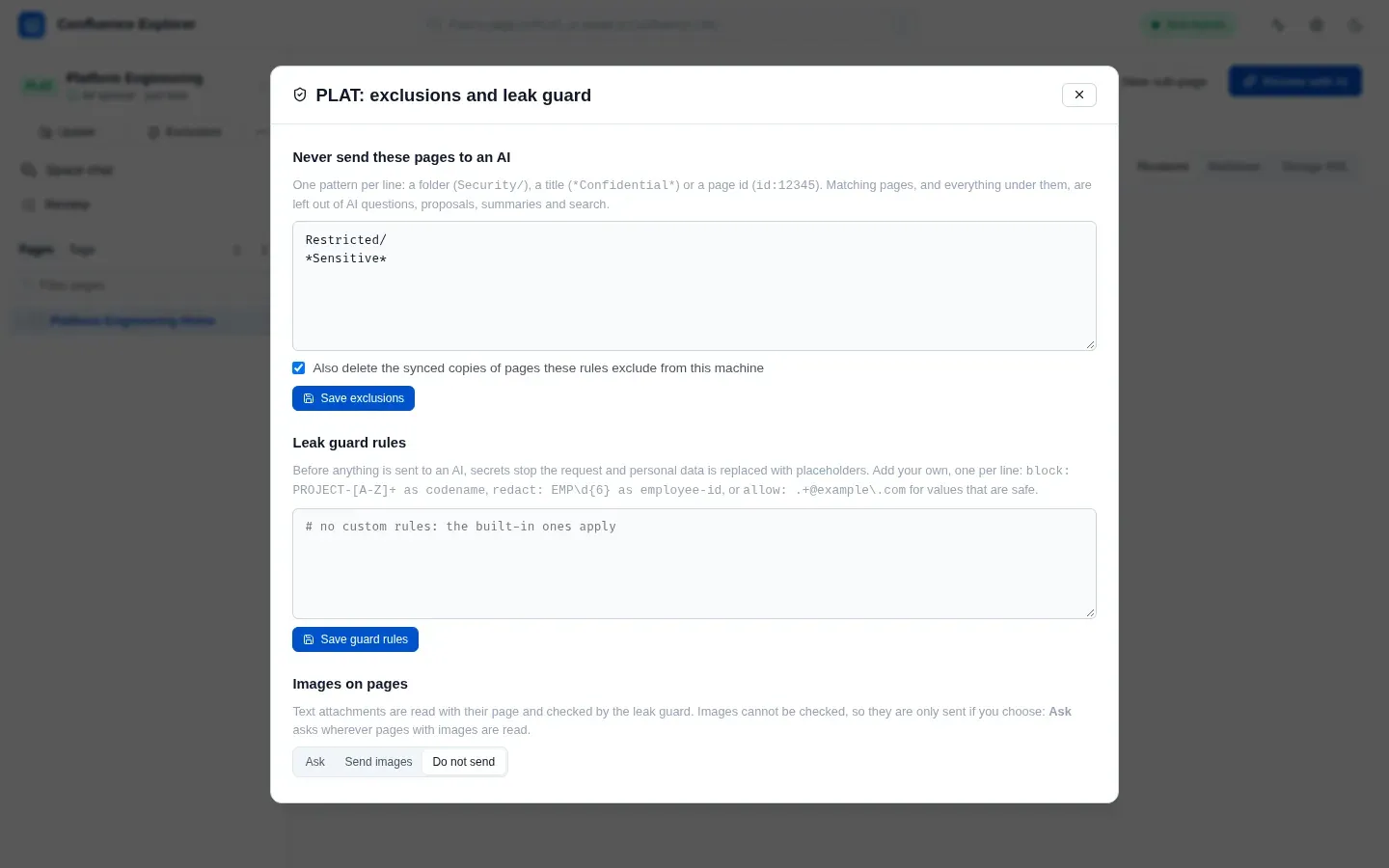
Write one rule per line:
| Rule | Excludes |
|---|---|
Restricted/ | The page titled “Restricted” and everything under it |
*Confidential* | Every page whose title contains “Confidential”, and everything under those pages |
id:12345 | The page with that id, and everything under it |
Lines starting with # are ignored. Write page ids as id:12345: a bare number also matches any
title that contains it, and the doctor warns about bare numbers.
A rule also matches anywhere inside a title, so Restricted/ excludes “Unrestricted Access
Guide” as well. This errs on the side of excluding too much, which is the safe direction, but it can
surprise you; make a rule more specific if it catches pages it should not.
What an excluded page is kept out of
Section titled “What an excluded page is kept out of”An excluded page is treated as if it were not there, everywhere the app could pass it on:
- it is missing from the page tree, and opening it by address says it was not found;
- a sync does not download it, and the ZIP does not contain it;
- it is never sent to an AI: not when you ask about it, not as part of a directory, a tag or a whole space, not for a summary, and not as a suggestion when you write a new page;
- it does not appear in the app’s search.
When you save the rules, the box Also delete the synced copies of pages these rules exclude from this machine is ticked by default, so copies you downloaded before adding a rule are removed too.
If the rules file cannot be read, the app excludes every page in that space until it can be, and
the doctor reports the problem. The rules live in .confluenceignore in the space’s folder, so you
can also edit them in any text editor. Saving from the dialog rewrites that file, and comment lines
you wrote by hand are not kept.
The leak guard
Section titled “The leak guard”Everything sent to an AI passes through the leak guard first: your question, the page, earlier turns of the conversation, and any file you added. The guard looks for two kinds of thing.
Secrets stop the request. If the guard finds something that looks like a secret, nothing is sent, and you are told what was found and on which line, but not the value itself. The guard recognises:
- private keys;
- cloud and service tokens: AWS access keys, GitHub, GitLab, Slack, Atlassian, Google and Stripe keys, and AI provider keys;
- JSON web tokens, database connection strings with a password, and Azure storage keys;
- values written after words such as
password,secret,api_keyoraccess_token, unless the value is obviously a placeholder such as****,<your-token>orchangeme.
When you ask about many pages at once (a directory, chosen pages or a whole space), a page holding a secret is left out and named, and the rest are still sent.
Personal data is replaced. Email addresses, phone numbers, US Social Security numbers, card
numbers and IBANs are replaced with placeholders such as [EMAIL-1] before sending. The AI answers
using the placeholders, and the app puts the real values back into the answer on your screen. Each
value keeps the same placeholder for the whole conversation.
Under each answer, a short line says what the guard did, such as “Leak guard: nothing needed removing.”
Images are not checked. The guard reads text, so it cannot see a password in a screenshot. A page’s images are sent only for a space you chose to send them for (Exclusions → Images on pages), and every answer names the images it sent unchecked. Every other attachment, Word and Excel files included, is turned into text on your computer first and checked like the page; a chat set to Pages only reads none of them.
Your own guard rules
Section titled “Your own guard rules”The second box in the same dialog holds rules for things only your organisation knows about:
block: PROJECT-[A-Z]+ as codenameredact: EMP\d{6} as employee-idallow: .+@example\.comblock:treats a match as a secret, so a request containing it is not sent.redact:replaces a match with a placeholder, such as[EMPLOYEE_ID-1].allow:lets a value through that the guard would otherwise stop or replace, when the pattern matches the whole value.
Each rule is a regular expression, and matching is case-sensitive. A rule that does not parse is
refused when you save it, with the line number. The rules live in .confluenceguard in the space’s
folder.
What a large chat sends first
Section titled “What a large chat sends first”When a chat’s pages are too many to send in one request, the app first sends the AI the titles, places in the space, headings and AI summaries of up to 40 sections that may help, never their text, so it can choose which sections to read. Only pages the exclusion rules allow are among them, and the request passes the leak guard like any other. A review of that many pages, or a thorough answer, sends them in batches, each checked the same way; a thorough answer’s notes pass the guard again when they are combined. Text from a GitLab repository, added to a new page, is checked by the leak guard too; the exclusion rules do not apply to it, because it is not a Confluence page.
Embeddings
Section titled “Embeddings”When Search by meaning has a provider, building the AI index also sends the text of each section of each page to that provider’s embedding service, which may differ from the one that answers, which returns a list of numbers describing what the section means. The numbers are stored with the synced copy and let a question find a section by meaning. Each question is embedded too, so it can be compared with them. These are the same pages a summary already sends in full, and every request passes the leak guard: a section holding a secret is not sent at all, personal data is replaced, and excluded pages are never included. With it off, or left to Claude or the Gemini CLI, which make none, nothing extra is sent.
A record of what was sent
Section titled “A record of what was sent”Every request to an AI adds one line to data/ai-audit.jsonl in the app’s data folder: when it was
sent, to which provider, for which space, how many characters, and how many values the guard
replaced. Embedding requests are recorded the same way, with how many sections were sent and how
many were held back for holding a secret. It never records the content itself. The app’s own logs
in telemetry/ keep counts and page titles, never page text; see Troubleshooting.
Who can reach the app
Section titled “Who can reach the app”The app listens on 127.0.0.1, which only your own computer can reach. It also refuses any request
whose address or origin is not your computer, so a web page open in another tab cannot use it, even
though both run in the same browser.
To use the app from another machine, you must start it with --host and list the name you will reach
it by in ALLOWED_HOSTS. Think carefully before doing so: the app has no login of its own, so anyone
who can reach it can use your Confluence token through it.
How this is checked
Section titled “How this is checked”test/exclusions.test.ts checks the rule matching, including everything under an excluded page and
the over-match described above. test/aiRoutes.test.ts checks that an excluded page is refused on
every AI route. test/embeddings.test.ts checks that a section holding a secret is never embedded,
that personal data is replaced, that embedding requests are recorded, and that Claude sends nothing.
test/guard.test.ts holds sample secrets and personal data for every detector, and
checks that a refusal names the type and line but never the value. test/security.test.ts checks
that requests from other hosts and other sites are refused. test/e2e/ai.e2e.ts runs the exclusions
and the guard against a real Confluence Data Center.